Wanted Developer Guide
Acknowledgements
This project is a modification of AddressBook Level 3 (AB3). The code structure, models and documentation is reused and maintained in largely the same format as AB3.
Setting Up, Getting Started
Refer to the guide Setting up and getting started.
Design
Note: In this Developer Guide, the term loan book is used with the same meaning as Wanted list in the User Guide.
Architecture
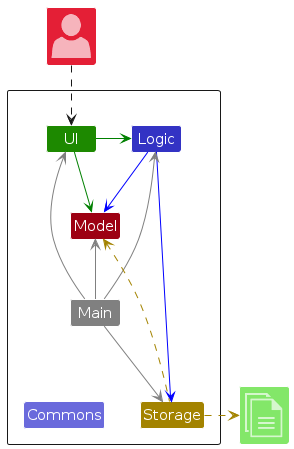
The Architecture Diagram given above explains the high-level design of the App.
Given below is a quick overview of main components and how they interact with each other.
Main components of the architecture
Main (consisting of classes Main and MainApp) is in charge of the app launch and shut down.
- At app launch, it initializes the other components in the correct sequence, and connects them up with each other.
- At shut down, it shuts down the other components and invokes cleanup methods where necessary.
The bulk of the app's work is done by the following four components:
UI: The UI of the App.Logic: The command executor.Model: Holds the data of the App in memory.Storage: Reads data from, and writes data to, the hard disk.
Commons represents a collection of classes used by multiple other components.
How the architecture components interact with each other
The Sequence Diagram below shows how the components interact with each other for the scenario where the user issues the command delete 1.
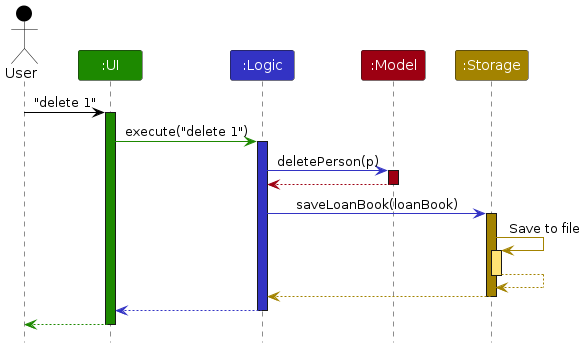
Each of the four main components (also shown in the diagram above),
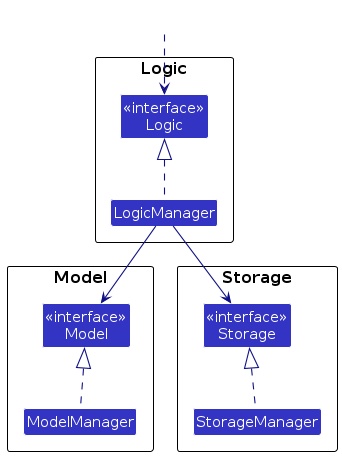
- defines its API in an
interfacewith the same name as the Component. - implements its functionality using a concrete
{Component Name}Managerclass (which follows the corresponding APIinterfacementioned in the previous point.
For example, the Logic component defines its API in the Logic.java interface and implements its functionality using the LogicManager.java class which follows the Logic interface. Other components interact with a given component through its interface rather than the concrete class (reason: to prevent outside component's being coupled to the implementation of a component), as illustrated in the (partial) class diagram below.
The sections below give more details of each component.
UI component
The API of this component is specified in Ui.java
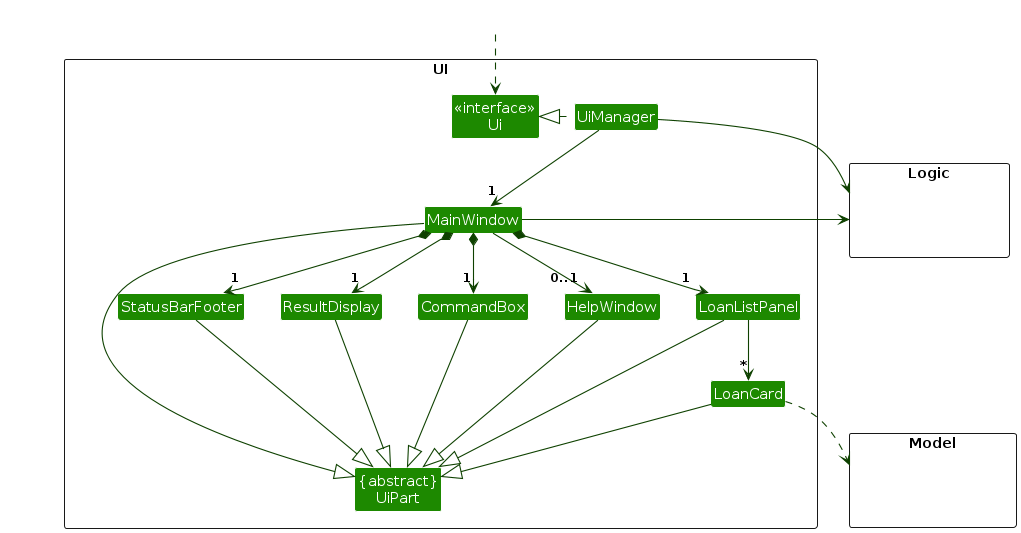
The UI consists of a MainWindow that is made up of parts e.g.CommandBox, ResultDisplay, LoanListPanel, StatusBarFooter etc. All these, including the MainWindow, inherit from the abstract UiPart class which captures the commonalities between classes that represent parts of the visible GUI.
The UI component uses the JavaFx UI framework. The layout of these UI parts are defined in matching .fxml files that are in the src/main/resources/view folder. For example, the layout of the MainWindow is specified in MainWindow.fxml
The UI component,
- executes user commands using the
Logiccomponent. - listens for changes to
Modeldata so that the UI can be updated with the modified data. - keeps a reference to the
Logiccomponent, because theUIrelies on theLogicto execute commands. - depends on some classes in the
Modelcomponent, as it displaysLoanobject residing in theModel.
Logic component
API : Logic.java
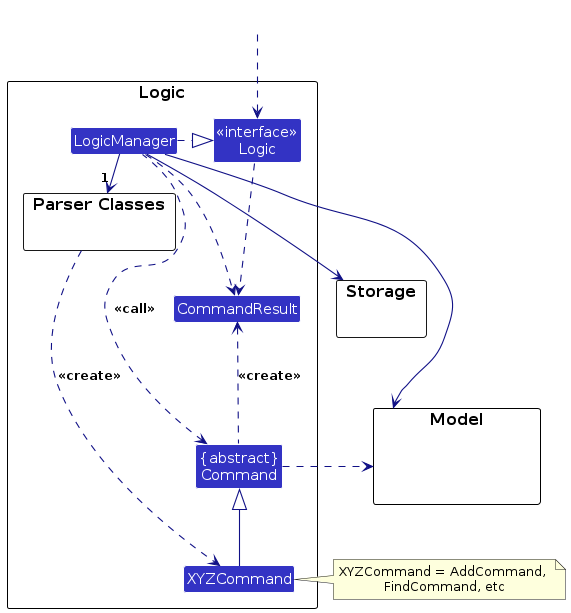
Here's a (partial) class diagram of the Logic component:
The sequence diagram below illustrates the interactions within the Logic component, taking execute("delete 1") API call as an example.
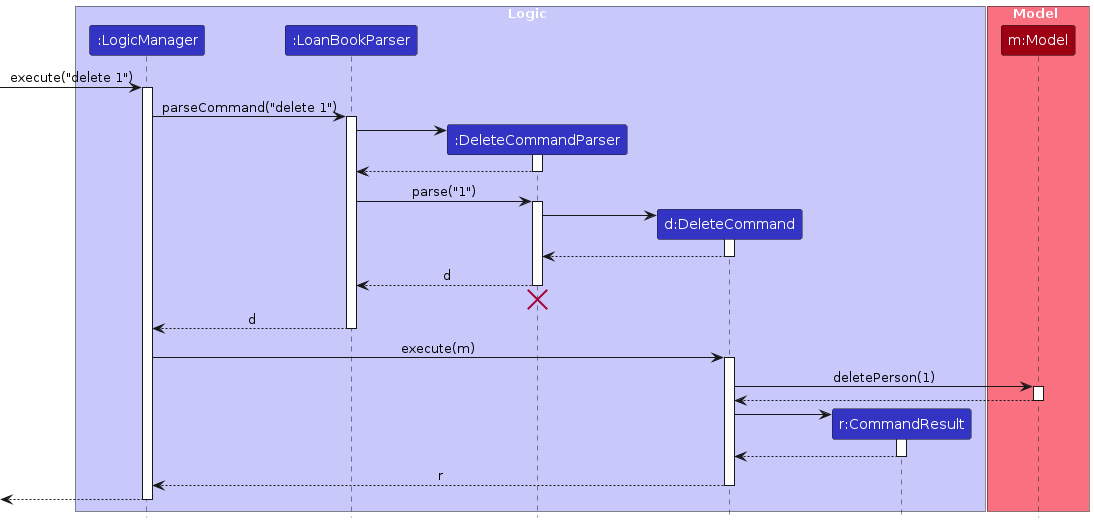
Note: The lifeline for DeleteCommandParser should end at the destroy marker (X) but due to a limitation of PlantUML, the lifeline continues till the end of diagram.
How the Logic component works:
- When
Logicis called upon to execute a command, it is passed to anLoanBookParserobject which in turn creates a parser that matches the command (e.g.,DeleteCommandParser) and uses it to parse the command. - This results in a
Commandobject (more precisely, an object of one of its subclasses e.g.,DeleteCommand) which is executed by theLogicManager. - The command can communicate with the
Modelwhen it is executed (e.g. to delete a loan).
Note that although this is shown as a single step in the diagram above (for simplicity), in the code it can take several interactions (between the command object and theModel) to achieve. - The result of the command execution is encapsulated as a
CommandResultobject which is returned back fromLogic.
Here are the other classes in Logic (omitted from the class diagram above) that are used for parsing a user command:
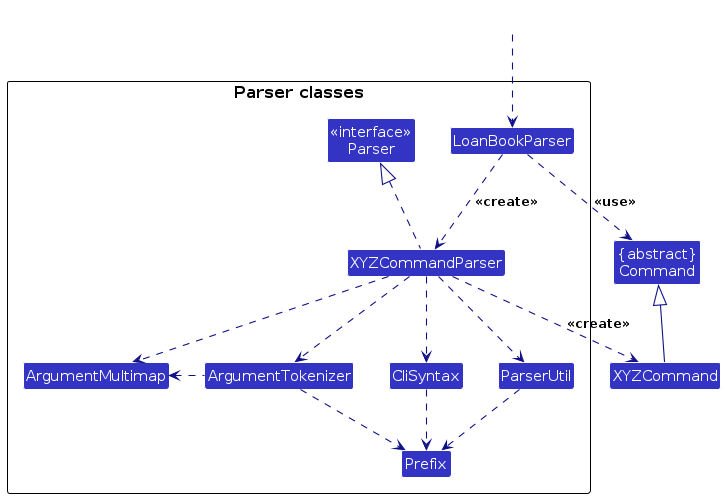
How the parsing works:
- When called upon to parse a user command, the
LoanBookParserclass creates anXYZCommandParser(XYZis a placeholder for the specific command name e.g.,AddCommandParser) which uses the other classes shown above to parse the user command and create aXYZCommandobject (e.g.,AddCommand) which theLoanBookParserreturns back as aCommandobject. - All
XYZCommandParserclasses (e.g.,AddCommandParser,DeleteCommandParser, ...) inherit from theParserinterface so that they can be treated similarly where possible e.g, during testing.
Model component
API : Model.java
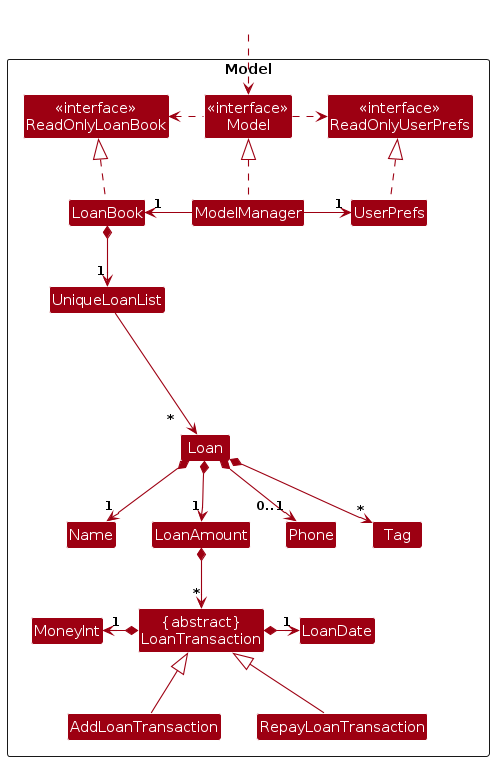
The Model component,
- stores the loan book data i.e., all
Loanobjects (which are contained in aUniqueLoanListobject). - offers a list of all the stored
Loanobjects to outsiders as an unmodifiableObservableList<Loan>that can be 'observed' e.g. the UI can be bound to this list so that the UI automatically updates when the data in the list change. - stores a
UserPrefobject that represents the user’s preferences. This is exposed to the outside as aReadOnlyUserPrefobjects. - does not depend on any of the other three components (as the
Modelrepresents data entities of the domain, they should make sense on their own without depending on other components)
Explanation of the LoanAmount class and its related components:
LoanAmountis a class responsible for managing the loan amount of an entry. EachLoanAmountinstance consists of a list ofLoanTransactionobjects.LoanTransactionis an abstract class representing a loan-related transaction. It is extended by two concrete subclasses:AddLoanTransactionandRepayLoanTransaction. Each subclass instance:- stores the transaction date using the
LoanDateclass, which encapsulates dates in a specific, consistent format. - stores the transaction amount using the
MoneyIntclass, which ensures exact representation of values with two decimal places (i.e. no precision loss).
- stores the transaction date using the
The constructor of
LoanAmounttakes an array ofLoanTransactionobjects and automatically computes the total loaned amount and the remaining loan amount of the entry. If the remaining loan amount becomes negative at any point during this calculation, the constructor throws an exception and theLoanAmountobject is not created.The only way to create a
LoanAmountobject is through the constructor described above. This design ensures that even when users modify the transaction history via commands, no invalid transaction history can be formed.
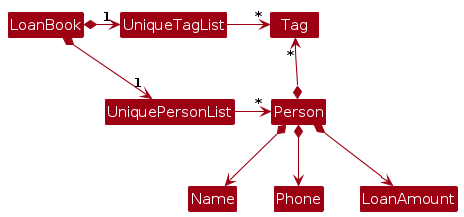
Note: An alternative (arguably, a more OOP) model is given below. It has a Tag list in the LoanBook, which Loan references. This allows LoanBook to only require one Tag object per unique tag, instead of each Loan needing their own Tag objects.
Storage component
API : Storage.java
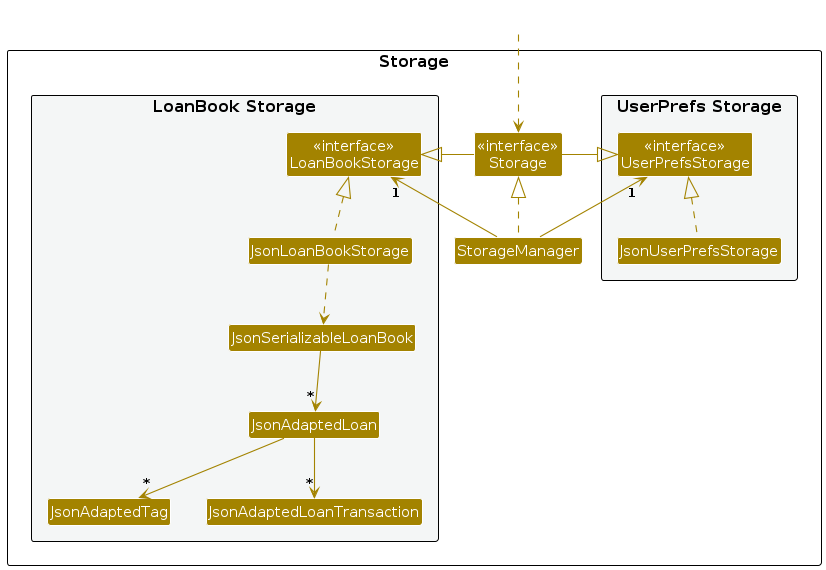
The Storage component,
- can save both loan book data and user preference data in JSON format, and read them back into corresponding objects.
- inherits from both
LoanBookStorageandUserPrefStorage, which means it can be treated as either one (if only the functionality of only one is needed). - depends on some classes in the
Modelcomponent (because theStoragecomponent's job is to save/retrieve objects that belong to theModel)
Common classes
Classes used by multiple components are in the wanted.commons package.
Proposed feature
This section describes a proposed feature and how it can be implemented.
[Proposed] Undo/redo feature
Proposed Implementation
The proposed undo/redo mechanism is facilitated by VersionedLoanBook. It extends LoanBook with an undo/redo history, stored internally as an loanBookStateList and currentStatePointer. Additionally, it implements the following operations:
VersionedLoanBook#commit()—Saves the current loan book state in its history.VersionedLoanBook#undo()—Restores the previous loan book state from its history.VersionedLoanBook#redo()—Restores a previously undone loan book state from its history.
These operations are exposed in the Model interface as Model#commitLoanBook(), Model#undoLoanBook() and Model#redoLoanBook() respectively.
Given below is an example usage scenario and how the undo/redo mechanism behaves at each step.
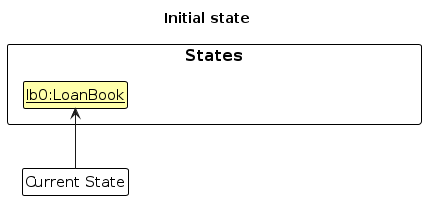
Step 1. The user launches the application for the first time. The VersionedLoanBook will be initialized with the initial loan book state, and the currentStatePointer pointing to that single loan book state.
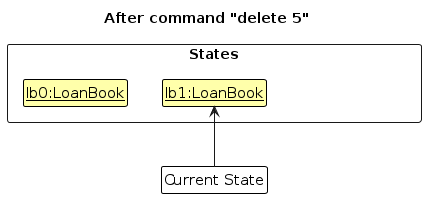
Step 2. The user executes delete 5 command to delete the 5th entry in the loan book. The delete command calls Model#commitLoanBook(), causing the modified state of the loan book after the delete 5 command executes to be saved in the loanBookStateList, and the currentStatePointer is shifted to the newly inserted loan book state.
Step 3. The user executes add n/David to add a new entry. The add command also calls Model#commitLoanBook(), causing another modified loan book state to be saved into the loanBookStateList.
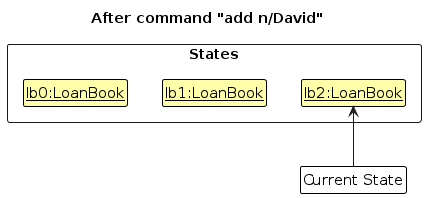
Note: If a command fails its execution, it will not call Model#commitLoanBook(), so the loan book state will not be saved into the loanBookStateList.
Step 4. The user now decides that adding the loan was a mistake, and decides to undo that action by executing the undo command. The undo command will call Model#undoLoanBook(), which will shift the currentStatePointer once to the left, pointing it to the previous loan book state, and restores the loan book to that state.
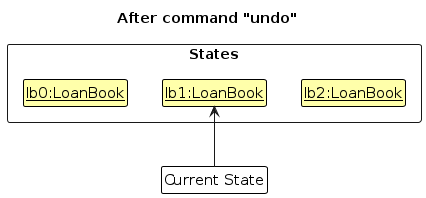
Note: If the currentStatePointer is at index 0, pointing to the initial LoanBook state, then there are no previous LoanBook states to restore. The undo command uses Model#canUndoLoanBook() to check if this is the case. If so, it will return an error to the user rather
than attempting to perform the undo.
The following sequence diagram shows how an undo operation goes through the Logic component:
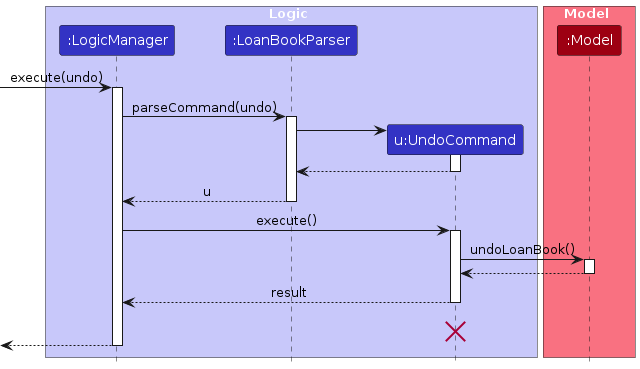
Note: The lifeline for UndoCommand should end at the destroy marker (X) but due to a limitation of PlantUML, the lifeline reaches the end of diagram.
Similarly, how an undo operation goes through the Model component is shown below:
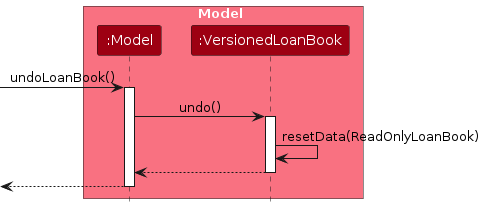
The redo command does the opposite—it calls Model#redoLoanBook(), which shifts the currentStatePointer once to the right, pointing to the previously undone state, and restores the loan book to that state.
Note: If the currentStatePointer is at index loanBookStateList.size() - 1, pointing to the latest loan book state, then there are no undone LoanBook states to restore. The redo command uses Model#canRedoLoanBook() to check if this is the case. If so, it will return an error to the user rather than attempting to perform the redo.
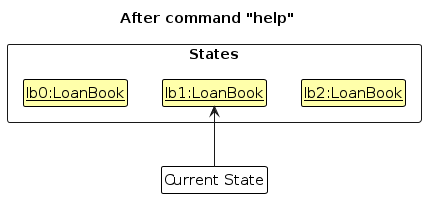
Step 5. The user then decides to execute the command help. Commands that do not modify the loan book, such as help, will usually not call Model#commitLoanBook(), Model#undoLoanBook() or Model#redoLoanBook(). Thus, the loanBookStateList remains unchanged.
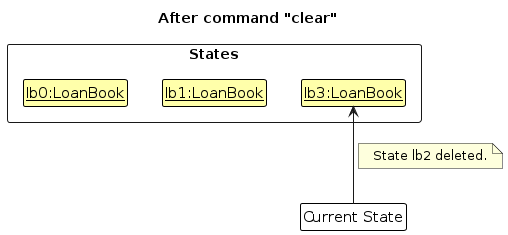
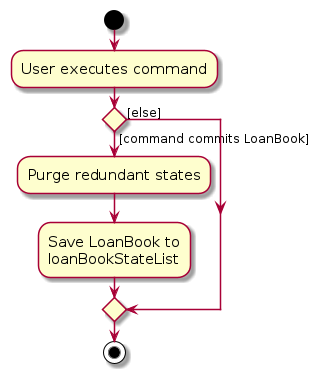
Step 6. The user executes clear, which calls Model#commitLoanBook(). Since the currentStatePointer is not pointing at the end of the loanBookStateList, all loan book states after the currentStatePointer will be purged. Reason: It no longer makes sense to redo the add n/David command. This is the behavior that most modern desktop applications follow.
The following activity diagram summarizes what happens when a user executes a new command:
Design considerations:
Aspect: How undo & redo executes:
Alternative 1 (current choice): Saves the entire loan book.
- Pros: Easy to implement.
- Cons: May have performance issues in terms of memory usage.
Alternative 2: Individual command knows how to undo/redo by itself.
- Pros: Will use less memory (e.g. for
delete, just save the loan being deleted). - Cons: We must ensure that the implementation of each individual command are correct.
- Pros: Will use less memory (e.g. for
Documentation, logging, testing, configuration, dev-ops
Appendix: Requirements
Product scope
Target user profile:
- loans money to others
- prefers desktop apps over other types
- can type quickly
- prefers typing to mouse interactions
- is reasonably comfortable using CLI apps
Value proposition: manage loans much more easily than manual tracking with manual calculations, in a faster and more efficient manner than mouse-based apps
User stories
Priorities: High (must have) - * * *, Medium (nice to have) - * *, Low (unlikely to have) - *
| Priority | As a … | I want to … | So that I can… |
|---|---|---|---|
* * * | loan issuer | keep track of the total amount of money owed to me | I can see how much I am due to collect |
* * * | user | add a new loan | I can track new loans that are given out |
* * * | user | delete a loan | remove loans that are no longer relevant |
* * * | user | view current loans | I can see the full list of loans that need to be returned |
* * | user | edit loans | I can update loan information if necessary |
* * | user | mark loans as returned | I can keep track of whether a loan was repaid |
* * | forgetful user | track the number of days since the loan was given | I can remind friends to return their loans |
* * | forgetful user | add phone numbers of people who owe me money | I can contact them if necessary |
* * | frequent loaner | view a history of all loans that have been fulfilled | I can keep track of past lending habits |
* * | new user | go through a new user guide | I learn how to use the program |
* * | new user | view example entries | I can learn how to use from the examples |
* * | user | blacklist people who are always late to return money | I can avoid loaning to particular individuals |
* * | user | tag individuals based on the amount of money lent | I can prioritise users that have larger ticket size loans |
* * | user | tag individuals based on their spending habits | I can avoid lending to high risk individuals |
* * | user | view a leaderboard of those with largest loans | I can have a visual representation of who needs to be chased for loans |
* * | user | see past loans categorised by month and loan type | I can project loaning for future months |
* * | user | delete all records | I can purge examples |
* * | user | sort records, by loan amount, period, priority etc. | I can see the most 'important' records for me |
* | forgetful user | upload photos of people who owe me money | I can match their appearance to their loans |
* | user | have notifications for those who have loaned for longer than duration | I can prompt them to return that it has been past a grace period |
* | user | send messages to send to people who owe me money | I can efficiently prod them to return the money |
* | user | customize the autogenerated message sent to those who owe money | I can better persuade them to return my money |
* | cash strapped user | calculate projected returns if everyone was to return loans | I can see how much I can earn back from chasing people for loans |
Use cases
(For all use cases below, the System is the Wanted application and the Actor is the user, unless specified otherwise)
Use case: UC01 - Add a New Loan
MSS
User requests to add a new loan with borrower's name.
System records the new loan in the loan list.
System confirms that the loan has been successfully added.
Use case ends.
Extensions
- 1a. System detects an error in the command entered.
- 1a1. System displays an error message and tells the user the correct format to enter.
- Use case resumes from step 1.
Use case: UC02 - Delete a Loan
MSS
User requests to delete a specific loan.
System removes the loan from the loan list.
System confirms that the loan has been successfully deleted.
Use case ends.
Extensions
- 1a. The loan does not exist in the system.
- 1a1. System displays a message indicating that the loan is not found.
- Use case ends.
Use case: UC03 - List Current Loans
MSS
User requests to list all loans by name in alphabetical order.
System retrieves and displays the list of loans.
Use case ends.
Use case: UC04 - Sort Current Loans
MSS
User requests to sort all loans by Remaining Loan Amount in decreasing order.
System retrieves and displays the list of loans.
Use case ends.
Use Case: UC05 - Increase a Loan Amount
MSS
User requests to add an increase transaction of a specified amount and date to a loan.
System creates a new increase transaction.
System adds the transaction to the transaction history of the loan.
System updates and displays Total Loaned Amount and Remaining Loan Amount of the loan.
Use case ends.
Extensions
- 1a. System detects an error in the command entered.
- 1a1. System displays an error message and tells the user the correct format to enter.
- Use case resumes from step 1.
Use Case: UC06 - Repay a Loan Amount in Full or Partially
MSS
User requests to add a repayment transaction of a specified amount and date to a loan.
System creates a new repayment transaction.
System adds the transaction to the Transaction History of the loan.
System updates and displays Total Loaned Amount and Remaining Loan Amount of the loan.
Use case ends.
Extensions
- 1a. System detects an error in the command entered.
- 1a1. System displays an error message and tells the user the correct format to enter.
- Use case resumes from step 1.
- 1b. System detects the repayment amount is greater than the Remaining Loan Amount of the loan.
- 1b1. System displays an error message informing the user to key in a valid repayment amount.
- Use case resumes from step 1.
Use Case: UC07 - Editing a Loan Transaction
MSS
User requests to modify the amount and/or date of a transaction in a loan.
System updates the transaction.
System updates and displays the updated transaction history, Total Loaned Amount and Remaining Loan Amount of the loan.
Use case ends.
Extensions
- 1a. System detects an error in the command entered.
- 1a1. System displays an error message and tells the user the correct format to enter.
- Use case resumes from step 1.
- 1b. System detects the modified amount will result in a negative Remaining Loan Amount.
- 1b1. System displays an error message informing the user to key in a valid amount.
- Use case resumes from step 1.
Use Case: UC08 - Deleting a Loan Transaction
MSS
User requests to delete a transaction in a loan.
System deletes the transaction.
System updates and displays the updated transaction history, Total Loaned Amount and Remaining Loan Amount of the loan.
Use case ends.
Extensions
- 1a. System detects an error in the command entered.
- 1a1. System displays an error message and tells the user the correct format to enter.
- Use case resumes from step 1.
- 1b. System detects the deleted transaction will result in a negative Remaining Loan Amount.
- 1b1. System displays an error message informing the user to key in a valid amount.
- Use case resumes from step 1.
Use Case: UC09 - Tag a Loan
MSS
User requests to add tag(s) to a loan.
System adds the tag(s) to the loan.
System displays the updated loan.
Use case ends.
Extensions
- 1a. System detects an error in the command entered.
- 1a1. System displays an error message and tells the user the correct format to enter.
- Use case resumes from step 1.
- 1b. User requests to delete all tags from a loan by entering an empty tag.
- 1b1. System removes all tags from the loan.
- Use case resumes from step 3.
Use Case: UC10 - Modifying the Phone of a Loan
MSS
User requests to modify the phone number of a loan.
System modifies the phone number of the loan.
System display the updated loan.
Use case ends.
Extensions
- 1a. System detects an error in the command entered.
- 1a1. System displays an error message and tells the user the correct format to enter.
- Use case resumes from step 1.
Use Case: UC11 - Clearing all Loans
*MSS
User requests to clear all loans from the list.
System deletes all loans from the list.
Use case ends.
Non-Functional Requirements
- Should work on any mainstream OS as long as it has Java
17or above installed. - Should be able to hold up to 1000 loans without a noticeable sluggishness in performance for typical usage.
- A user with above average typing speed for regular English text (i.e. not code, not system admin commands) should be able to accomplish most of the tasks faster using commands than using the mouse.
Glossary
- Mainstream OS: Windows, Linux, Unix, MacOS
- Loan: A group of information associated with a person the user lends to.
- Loan Issuer: The loan who lends money or items to others and expects repayment or return.
- User: A general term for loan issuers managing their loans.
- Forgetful User: A user who needs additional reminders and tracking features to recall outstanding loans.
- Frequent Loaner: A user who frequently lends money or items and needs an organized record of past and present loans.
- Cash-Strapped User: A user who urgently needs to recover loaned money to maintain financial stability.
- New User: Someone who has just started using the system and may require guidance on how to navigate it.
- Amount: A sum of money.
- Total Loaned Amount: Total amount of money loaned to a person across all transactions associated with them.
- Remaining Loan Amount: Amount of money a person is yet to repay across all transactions associated with them.
- Transaction: An action to increase or repay the loan owed to the user.
- Tags: A method of categorizing individuals based on different attributes such as spending habits, friends, family etc.
- Leaderboard: A visual ranking system displaying individuals with the highest loans.
- Transaction History: A record of all transactions under a current loan, categorized by increase or repay transactions.
- Clear: The ability to delete all stored loan data, often used to clear test or example entries.
- Example Entries: Pre-filled sample data to help new users understand how the system works.
- Wanted/Not Wanted: UI element on each loan entry representing whether the loan is fully returned.
Appendix: Instructions for manual testing
Given below are instructions to test the app manually.
Note: These instructions only provide a starting point for testers to work on; testers are expected to do more exploratory testing.
Launch and shutdown
Initial launch
Download the latest jar file and copy into an empty folder.
Run the jar file with Java 17 (best to be done through command line). The default window size may not be suitable.
Saving window preferences
Resize the window to a desired size. Move the window to a different location. Close the window.
Re-launch the app.
Expected: The most recent window size and location is retained.
Adding a loan
Prerequisites: No entries are in the list, easiest done by clearing all entries from the list by running
clear.Creating a new entry
Test case:
add n/John
Expected: A new entry with nameJohnis created in position 1. It should also have the default parameters of $0.00 in loan amount, no tags and no phone number.Test case:
add n/John
Expected: No entry is created. Error details shown in status message. Command is not erased from input field.Test case:
add n/john
Expected: A new entry is namejohnis created with default parameters.
Adding a phone number to entries
Test case:
phone 1 p/98765432
Expected: Adds the phone number98765432to the entry forJohn.Test case:
phone 1 p/
Expected: Deletes the phone number and removes it from the display for the entry forJohn.Test case:
phone 2 p/abcdefgh
Expected: No phone number is updated. Error details shown in status message. Command is not erased from input field.
Adding tags to entries
Test case:
tag 1 t/friend t/frequentloaner
Expected: Adds the tagsfriendandfrequentloanerto the entry forJohn.Test case:
tag 1 t/
Expected: Removes all tags from the entry forJohn.
Adding loans to entries
Test case:
increase 1 l/100.00 d/2025-01-01
Expected: The entry forJohnat index 1 has a loan for $100.00 on 2025-01-01 recorded in its transaction history, and the remaining loan amount and the total loaned amount are increased by $100.00.
The entry should now show "Wanted" instead of "Not Wanted".Test case:
increase 1 l/-100.00 d/2025-02-02
Expected: No transaction is created. Error details shown in the status message. Command is not erased from input field.
Repaying a loan
Prerequisites: The first entry on the currently displayed list has a remaining loan amount of $100.00.
Adding loan repayments to entries
Test case:
repay 1 l/60.00 d/2025-01-03
Expected: The first entry on the list now has a remaining loan amount of $40.00. The repayment transaction details are added to the transaction history.Test case:
repay 1 l/50.00 d/2025-01-04
Expected: No transaction is created. Error details shown in the status message. Command is not erased from input field.Test case:
repay 1 l/40.00 d/2025-01-04
Expected: The first entry on the list now has a remaining loan amount of $0.00 and shows "Not Wanted". The repayment transaction details are added to the transaction history.
Editing loan transaction history
Prerequisites: The first entry on the currently displayed list has a transaction history of exactly a $100.00 loan in the first slot and a $50.00 repayment in the second slot.
Editing loan transaction history
Test case:
edithist 1 i/2 l/60.00 d/2025-01-10
Expected: The repayment transaction is increased to $60.00 and the date is changed to 2025-01-10. The remaining loan amount of the entry should be updated to $40.00.Test case:
edithist 1 i/1 l/40.00
Expected: No change occurs. Error details shown in the status message. Command is not erased from input field.Test case:
edithist 1 i/1 l/250.00
Expected: The loan transaction is increased to $250.00. The date is unchanged. The remaining loan amount and the total loaned amount of the entry should be updated to $190.00 and $250.00, respectively.Test case:
edithist 1 i/5 l/100.00
Expected: No change occurs. Error details shown in the status message. Command is not erased from input field.
Deleting loan transaction history
Prerequisites: The first entry on the currently displayed list has a transaction history of exactly a $100.00 loan in the first slot and a $50.00 repayment in the second slot.
Test case:
delhist 1 i/1
Expected: No change occurs. Error details shown in the status message. Command is not erased from input field.Test case:
delhist 1 i/2
Expected: The transaction for the repayment is deleted. The remaining loan amount is reverted to $100.00.
Finding specific entries
Prerequisites: There are multiple entries on the list with different names, with at least one entry containing
Johnin the name and no entries containingJim.Test case:
find John
Expected: Entries containing the nameJohn(case-insensitive) are moved to the top of the list.Test case:
find Jim
Expected: No change occurs.
Displaying all entries by name in alphabetical order
Prerequisites: There are multiple entries on the list with different names
Test case:
list
Expected: All entries are sorted in alphabetical order of name.
Sorting the list
Prerequisites: There are multiple entries on the list with different Remaining Loan Amount.
Test case:
sort
Expected: All entries are sorted in decreasing order of Remaining Loan Amount.
Deleting a loan
Prerequisites: Multiple loans in the list.
Test case:
delete 1
Expected: First entry is deleted from the list. Details of the deleted entry shown in the status message.Test case:
delete 0
Expected: No loan is deleted. Error details shown in the status message. Command is not erased from input field.Other incorrect delete commands to try:
delete,delete x,...(where x is larger than the list size)
Expected: Similar to previous.
Appendix: Planned Enhancements
Team Size: 5 pax
- Names that do not match exactly, case-sensitive, are currently considered different names and can be added.
As this may often be a result of user error, we plan to add detection for case-insensitive matches and prevent them from being added or renamed.
For instance,
add n/johnshould fail if an entry forJohnalready exists. - Names that contain special characters that are non-alphanumeric are currently not supported.
As such names do exist, we plan to add support for common special characters in names, such as
/and-. - There are currently no checks for dates in transaction history, allowing transactions to be edited to be out of order. We plan to add date checking to ensure transaction editing enforces a sensible timeline.
- Likewise, as there are no checks for dates in transaction history, transactions may be recorded out of date order. We plan to make transactions displayed by date order in the transaction lists.
- Phone numbers are currently required to be alphanumeric.
We plan to add support for allowing international phone numbers with the
+character for country code.
Appendix: Effort
This project involved restructuring the model of AB3 associating information with a Person to our model of associating information with a Loan.
As part of our objective was to automate the calculation of loan amounts for the user, we needed to implement ways to easily track and update information in the Loan. We created several new classes to encompass the new data types of money, dates, as well as the LoanAmount and LoanTransaction classes to hold information involving how the user interacts with their loanees.
During the MVP phase of our project, we had initially planned to simply track each loan transaction individually, with each loan transaction being its own Loan object, allowing our model structure and program to function similarly to AB3. However, we discovered that this would make it difficult to track loans associated with a single person to collate information such as Total Loaned Amount and Remaining Loan Amount, and this would not accurately simulate cases where a person borrows multiple times before repaying all at once, or partially repaying for multiple loans in amounts that did not match the borrowed amounts exactly.
As such, we embarked on significant code restructuring across v1.4 and v1.5 to get to our current model, allowing us to associate all transactions with a single person under a Loan, which also provided much easier ways to display that information in a grouped manner that made more realistic sense. This allowed us to then implement easier methods to track Total Loaned Amount and Remaining Loan Amount, allowing us to display that information at all times up front. This also required modification of the UI to accommodate the grouping of information.
In addition to the code restructuring, we introduced new features to edit and delete transaction history. Implementing these features required us to revisit the design of the Loan model and the command execution mechanism, ensuring that the model itself enforces the validity of the transaction history. This design choice eliminated the need for each individual command to perform its own validity checks when modifying loans.
Additionally, unlike AB3, where all information in an entry could be added or edited in a single command, we chose to have each piece of information split out into separate commands. This necessitated creating many additional Command and CommandParser classes, as well as many additional test cases. Doing so benefits the user as it splits up the entering or editing of information into individual pieces that they are able to perform step-by-step, while also clearly showing the user on the exact pieces of information they wished to input being in an invalid format.